A PDF is a finished document — but sometimes what you actually need is a picture. PDF to Image for Mac renders every page of a PDF into a crisp, faithful image: JPEG, PNG, TIFF, BMP or GIF. No screenshots, no quality loss, no cloud upload.
Screenshots of a PDF come out soft, miss the edges and can't be scaled. This app renders the page at the resolution you choose, so a slide meant for a 4K display stays sharp, and a scan meant for email stays small. Drag in a single file or a whole folder — the queue takes care of the rest.
System Requirement: macOS 13.0 or later · Native support for Apple Silicon (M1/M2/M3/M4) and Intel
The slide that has to go into a newsletter. Your deck is a PDF and the marketing team needs one slide as a crisp image for the email header. Rendering it at 300 DPI gives them a sharp PNG — no jagged edges, no reshooting the screen.
The archive that must never be edited. A signed contract, a stamped invoice, a dated approval. Turn each page into an image and the text can't be changed — only viewed. Perfect for records you need to keep, not revise.
The figures trapped inside a scan. A 200-page scanned report has charts worth reusing, but there is no source file and no text layer. Extract the embedded images in their original quality, or render the pages at high DPI and crop what you need.
One drag, and every page is an image. PDF to Image for Mac does one job and does it well: turn PDF pages into high-quality images on your Mac, in batches and offline. Set the format, the resolution and the color depth; preview the pages; pick exactly the range you need; and let the app render while you get on with the rest of your work.
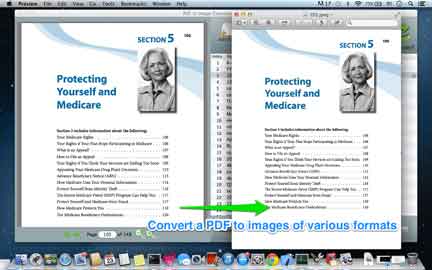
Not every destination wants the same file. A product photo goes out as a PNG with transparency intact; a manuscript page goes to TIFF at 300 DPI for the archive; a quick preview goes to JPEG to keep the size down. The same PDF, rendered once, exported everywhere.
JPEG for small files and easy sharingPNG for sharp edges, text and transparencyTIFF for archiving and print workflowsBMP and GIF for legacy compatibilityA PDF often contains photos and diagrams that were never meant to be text. Why re-photograph a photo? PDF to Image for Mac pulls the embedded raster images straight out of the file — at their original resolution, with no re-encoding and no quality loss — from one file or a whole folder at once.
.txt file when you need the words, not the picture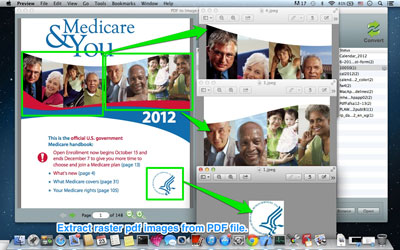
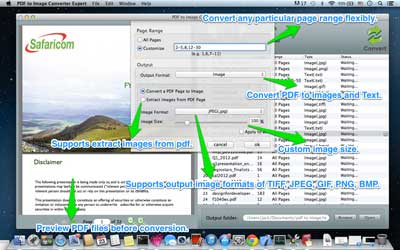
Resolution, color depth and scale are yours to set. Need a thumbnail grid for a portfolio? Render at 72 DPI. Need a page sharp enough to print at A3? Push it to 600 DPI. The app renders to the spec you give it, so the file is exactly as heavy — and exactly as crisp — as you intended.
You rarely need all 400 pages. Preview every page as a thumbnail, tick the ones you want, and convert just those. Combine page selection with batch mode and you can pull the same three pages out of fifty different reports in one pass.
3-12), single pages (7), or combinations (1,4,9-11)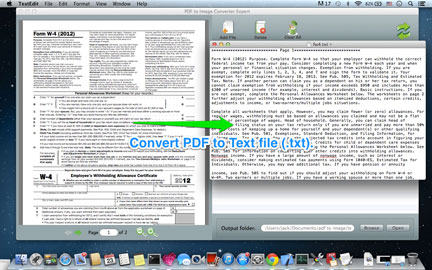
Vector text and sharp lines stay sharp. What you render is what the page contained — not a fuzzy screenshot.
Native renderer, no cloud round-trip. A 300-page scan turns into images while you make coffee.
Everything runs on your Mac. No uploads, no accounts, no traces left on a server.
Drag, pick a format, set the DPI, click. No settings labyrinth. Works offline, with files of any size.