Powerful PDF tools for Mac & iOS

Convert, create, encrypt, compress, split and crop PDFs — all on your local machine. No upload required.

Our Products

Native on Mac, privacy-first by design

PDF Converter for Mac Expert

One app, every direction
  • One app, every direction — convert PDF to Word, PowerPoint, iWork Pages, Keynote, images and Text.
  • Preserve original image quality after conversion.
Learn more →

PDF Compress for Mac Expert

Hit your target file size
  • Rich choices of compression options.
  • Compress to the file size you need. Optimize images, remove dead objects and metadata.
Learn more →

PDF Redact & Doodle

True redaction, handwritten annotation
  • Smear sensitive content for good — unrecoverable after export. Handwritten notes, signatures, text boxes and image stamps.
  • Open & mark in seconds; apply a smear to all pages at once. Edits auto-save with each document.
Learn more →

PDF Unlocker for Mac Expert

Got a PDF you own but can't open?
  • Decrypt password-protected Adobe Acrobat PDF files in seconds.
  • Remove PDF password and restrictions. Efficient decryption function.
Learn more →

SnapText for Mac

See text where there is none
  • Instantly recognize text from images, screenshots and scanned PDFs with built-in AI.
  • Copy, search and edit the extracted text right away — no retyping needed.
Learn more →

PDF to Keynote Converter for Mac Expert

Rescue charts and diagrams from old PDFs
  • Salvage diagrams, charts and layouts from old decks. Import into Keynote and rebuild on a clean slide.
  • Keep the original PDF formatting and layout.
Learn more →

PDF Factory for iOS

All-in-one iOS utility
  • Merge, convert, encrypt, decrypt, repair, compress — all in one app.
  • Process PDFs locally, no uploading required.
Learn more →

PDF to PPT for Mac Expert

PDF → editable .pptx
  • Slides come back as real PowerPoint objects — text boxes, bullet lists and tables stay editable, not flattened images.
  • Keep the original PDF formatting and layout.
Learn more →

PDF to Word Converter for Mac Expert

PDF → editable .docx
  • Breathe editability back into a locked PDF. Paragraphs, tables and lists come out as real Word objects, not pictures.
  • Convert PDF to Word quickly and easily.
Learn more →

PDF to iWork for Mac Expert

The only converter that speaks native iWork
  • Convert PDF to iWork Pages, iWork Keynote, Plain Text and images.
  • Preview the PDF file within the app.
Learn more →

PDF to Pages Converter for Mac Expert

Pixel-perfect .pages output
  • Your pagination, columns and embedded fonts survive the trip. Open in Pages and start editing from a solid base.
  • Keep the original PDF formatting and layout.
Learn more →

PDF Crop for Mac Expert

Trim PDF pages
  • Crop / trim PDF pages.
  • Support batch crop and cropping encrypted PDF files.
Learn more →

PDF Encrypt for Mac Expert

Control who can open, print, copy
  • Prevent opening without the correct open password.
  • Prevent printing and copying of the document. Set author, subject, title and keywords metadata.
Learn more →

PDF to Text for Mac Expert

Plain text, ready for anything
  • Export text content into editable text, preserving layout.
  • Convert restricted PDF files. Specify page range to convert.
Learn more →

PDF to Image for Mac Expert

PDF → JPG / PNG / TIFF…
  • Convert PDF to JPEG, GIF, PNG, BMP, TIFF.
  • Extract images from PDF document. Also convert PDF to Text file (.txt).
Learn more →

The PDF software trusted by millions of users

PowerfulPDF is your number one app for editing PDF with ease. Enjoy all the tools you need to work efficiently with your digital documents while keeping your data safe and secure.

I googled for an application to transfer the document from PDF to PowerPoint, and I found this application. I thought that the output would be kind of trash, but I have got shocked with the result. It is 99% of the PDF. 2000 star for this application.
- by Hardik Kothari
Wow that saved the day! Just dragged three PDF's guest lecturer was giving and in a few seconds, walaa! Too easy!
- by Warren Jones
This is a GREAT way to get the document back to a manageable format!
- by Gay Beth Bingham
I was able to convert them all to a format that I could easily make my changes, and the print them. I'm sure glad I found this. It made my life a lit easier.
- by Pescerosso
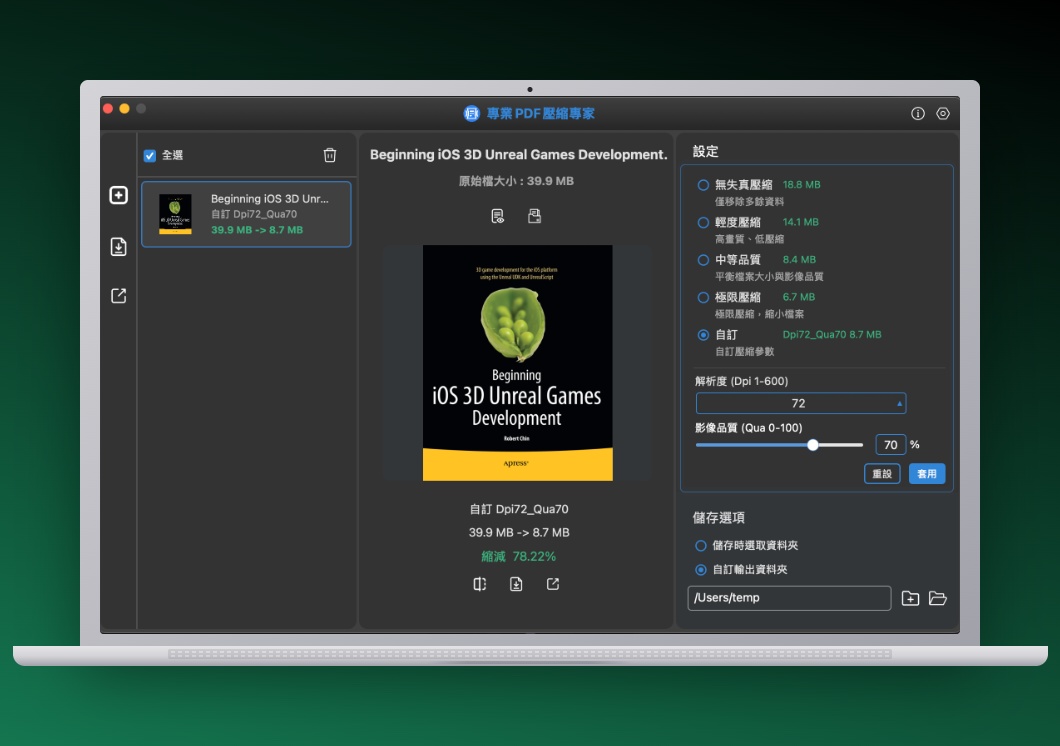
PDF Compress
Featured · Shrink PDF

Shrink PDFs without sacrificing quality

Email that 80 MB scan? Compress PDFs smartly with rich options — optimize images, strip dead objects and metadata, hit your target file size. Your document stays sharp, your inbox stays happy.

Go to PDF Compress →